


- Jill
Questions
0
Answers
121
-
Sure, but the DB server does not support using NAS.
Relocation Steps Between Different Hosts (Steps for Relocating Server1 to Server2):
- Step 1: Stop the iSLM service on Server1.
Launch MDXiSLMStartUpTool as Administrator and Stop all services after
- Step 2: Stop the iSLM-DB service on Server1.
Execute Moldex3D iSLM Stop DB as an Administrator, and use the job administrator to confirm that all services starting with Moldex3D iSLM have been Stopped. If there are any, you can right-click to stop it manually (Moldex3D iSLM DataBase Server should be the least stopped)
- Step 3: Copy the database from Server1 to Server2.
Copy the folder data into the iSLM-DB installation path of Server1 (or another user-specified path during installation) to Server2. It is recommended to place it in the default path C:\Moldex3D\iSLM-DB or a disk with larger space
- Step 4: Reinstall iSLM and iSLM-DB on Server2.
Launch installation of iSLM (optional) and iSLM-DB on Server2, and directs the iSLMDB Data Folder to the folder copied from Server1
ᅳ If no need to install iSLM on Server2, refer to Step 5 to modify Server1 settings, or otherwise refer to Step 6.
- Step 5: Scenario where iSLM remains on Server1 but iSLM-DB is on Server2.
If iSLM and iSLM-DB are not both installed on Server2,
ᅳ In Configure menu of StartUp Tool, click Database to modify iSLM setting (Server1)
ᅳ Select islmDB as the Database Name, and specify Host with Server2 IP
ᅳ After the modification saved, click Start to activate the iSLM service
- Step 6: Scenario where both iSLM and iSLM-DB are removed from Server1.
ᅳ After confirming the connection to the iSLM-DB on Server2, the iSLM web can be used normally. The Moldex3D-iSLM-DB can be removed via the control panel on Server1 by using the uninstall program feature.
ᅳ The original folder of Server1 will be retained and can be removed if the service working fine through Server2
- 694 views
- 1 answers
- 0 votes
-
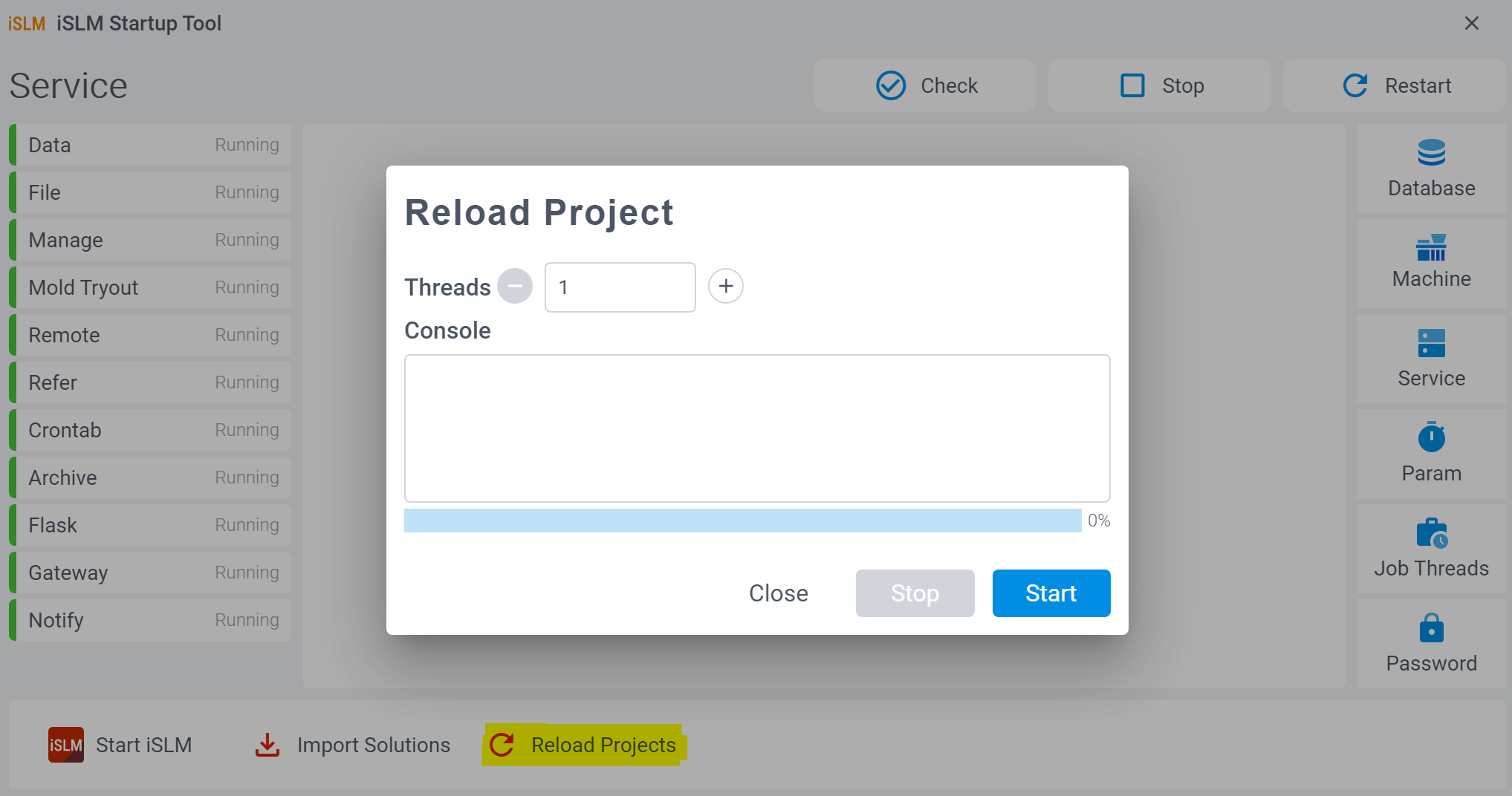
The possible cause of this result is that the Reload Project function was not executed in the iSLM Startup Tool beforehand. If you are certain that there are enough projects in iSLM to perform these two functions, please ensure that the Reload Project function is executed after the upgrade installation. This will ensure that the existing project data can be accessed by these two functions.
- 691 views
- 1 answers
- 0 votes
-
The reason for this issue is that although the Workflow includes Cooling and Warpage analysis, the user has used Gate Design Discovery. When the project only has gate without a complete runner system, these two types of analyses cannot be performed. Therefore, if you want to run Cooling or Warpage analysis, it is recommended to manually select the gate option. Additionally, when manually creating the gate, use the Runner & Cooling Channel Wizard to complete the runner and cooling channel setup. This will allow both analyses to be executed successfully.

- 886 views
- 1 answers
- 0 votes
-
When the system fails to generate a report and the message “Not enough reference projects in iSLM. Please upload more projects and try again.” appears on the page, it indicates that no similar projects are available for comparison. You can resolve this issue by increasing the number of Moldex3D projects.
- 661 views
- 1 answers
- 0 votes
-
After using the Auto Launch feature, you can go to the Activity Center to track the analysis progress.
The Activity Center is designed for users to monitor the progress of project uploads, conversions, or creations. It also includes a linking function that allows users to quickly navigate to the corresponding page to check the project execution status.
- 733 views
- 1 answers
- 0 votes
-
After creating a Solution, there are three ways to display the model image in the Picture:
-
- Upload the Project on the Moldex3D page.
- Upload the file in the Part Design section of the Archives page.
- Upload the project on the 3rd Party CAE page.
Additionally, if data is uploaded to multiple pages, the priority order for displaying the Picture in the Solution List will be: Moldex3D > Archive Part Design > 3rd Party CAE Project.
- 548 views
- 1 answers
- 0 votes
-
-
The possible reasons for failing to generate the Mold Design Discovery report are as follows:
*Issues related to model anomalies, with the following message:
-
- Unable to generate Mold Design Discovery with this model. Please replace the Part Design 3D File and try again.
*No similar projects found for comparison, with the following message:
-
- Not enough reference projects in iSLM. Please upload more projects and try again.
*Other unlisted issues, with the following message:
-
- Mold Design Discovery report generation failed. Please try again or contact the system administrator for assistance.
- 669 views
- 1 answers
- 0 votes
-
-
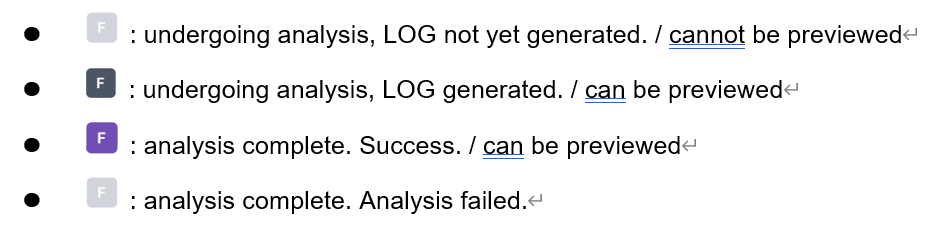
In the Project Summary > Log Result field, the analysis step results for each run are represented as follows: F (Filling), P (Packing), C (Cooling), and W (Wrapping).
Additionally, their colors will represent four different types:
- 592 views
- 1 answers
- 0 votes
-
Yes, if you edit the information on the Carbon Emissions page and then switch to another page, the system will automatically save the information on Carbon Emissions page, so you don’t need to worry.
- 627 views
- 1 answers
- 0 votes
-
The following will introduce the relocation steps for different hosts:
Step1. Stop iSLM service of Server1:
Launch MDXiSLMStartUpTool as Administrator and then Stop all services
Step2. Stop iSLM-DB service of Server1:
Excute Moldex3D iSLM Stop DB as an Administrator, and use the job administrator to confirm that all services starting with Moldex3D iSLM have been Stopped. If there are any, you can right-click to stop it manually (Moldex3D iSLM DataBase Server should be the least stopped)
Step3. Copy the database of Server1 to Server2:
Copy the folder data into the iSLM-DB installation path of Server1 (or another user-specified path during installation) to Server2. It is recommended to place it in the default path C:\Moldex3D\iSLM-DB or a disk with larger space
Step4. Reinstall iSLM and iSLM-DB on Server2:
Launch installation of iSLM (optional) and iSLM-DB on Server2, and directs the iSLMDB Data Folder to the folder copied from Server1
If there are other situations or if you need to move different hard drives with the same host, please contact your agent or sales representative for more detailed information.
- 674 views
- 1 answers
- 0 votes


