
RE: iSLM Project Sync 無法同步上傳專案,出現 Failed to check server license type, error=not found 訊息

iSLM Project Sync 無法同步上傳專案,出現 Failed to check server license type, error=not found 訊息,該怎麼處理?
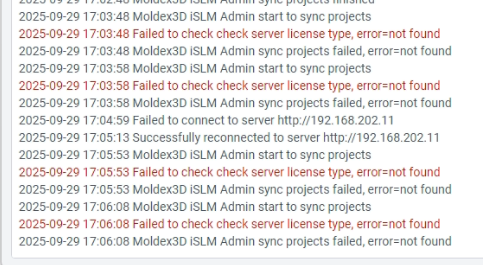
iSLM Project Sync 無法同步上傳專案,出現 Failed to check server license type, error=not found 訊息

Robin Asked on 30 9 月, 2025 in FAQ.
Add Comment
1 Answers

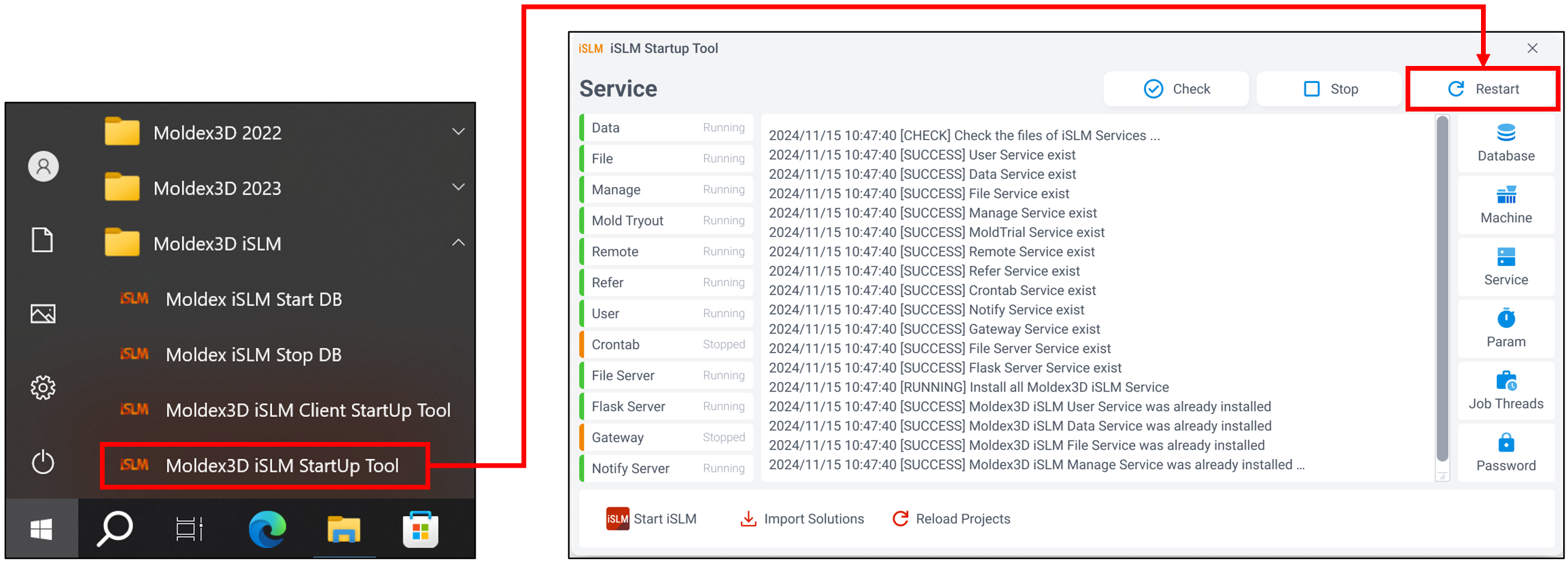
若出現此錯誤訊息,請重新啟動服務以解決問題

*重啟服務步驟:

1. 從 Start Menu 開啟 Moldex3D iSLM Startup Tool

2. 點擊 Restart 即可重啟服務
RE: iSLM Project Sync 無法同步上傳專案,出現 Failed to check server license type, error=not found 訊息

Answered on 1 10 月, 2025.
Add Comment

Your Answer

By posting your answer, you agree to the privacy policy and terms of service.